 Angela
Managing Inventory In Small Business: Principles And Best Practices
Learn the techniques to maintain a profitable stock
Arranging stock in your warehouse can be a tough and often confusing endeavor but there are many ways to ensure successful management and control even if you run a small service business.
Table of Contents
Inventory Management Fundamentals
Execution and Record-Keeping
Techniques to Maximize Efficiency When Managing Inventory
Final Thoughts
One of the top things that define a successful company is its ability to properly maintain inventory. This means that you have both the right product, and the right amount of this product. It also means that you need to manage your warehouse space well by storing everything you need at the right place. If you are looking for proven ways to establish a profitable warehouse in your company, this article is for you.
Inventory Management Fundamentals
Inventory management is the process of organizing and optimizing the flow of materials and their storage over time. This includes maintaining a stock of raw materials, consumables, ready-to-sell goods, or spare parts. It can be broken down into two major components: planning and execution.
What to Do at the Start
Planning your inventory is the first step when trying to figure out how much of a given item you should be ordering. You can always order more than you need to make sure that there are enough goods available in case of high demand. But it’s also crucial to not overstock your storage space and wind up with a bunch of inventory that you don't need. When you order your inventory, take into account the number of items each order contains, how many items you want in your stock room at a time, and your ordering frequency.
There are a few basic principles you should follow when building out your company’s warehouse management system to keep your supply well balanced and to control expenditures. Consider the following:
1. Stock levels. It is important to make sure you know your fast- and slow-sellers before ordering new batches. This is when knowing the usage trends of the particular product comes in handy.
2. Delivery time. When calculating the minimum and maximum stock levels, take into account how fast you can receive products you order to refill your stock. Then, make sure your inventory management solution notifies you when they are running low. E.g., in RO App’s jewelry inventory software, you’ll see such items marked red in the stock list:
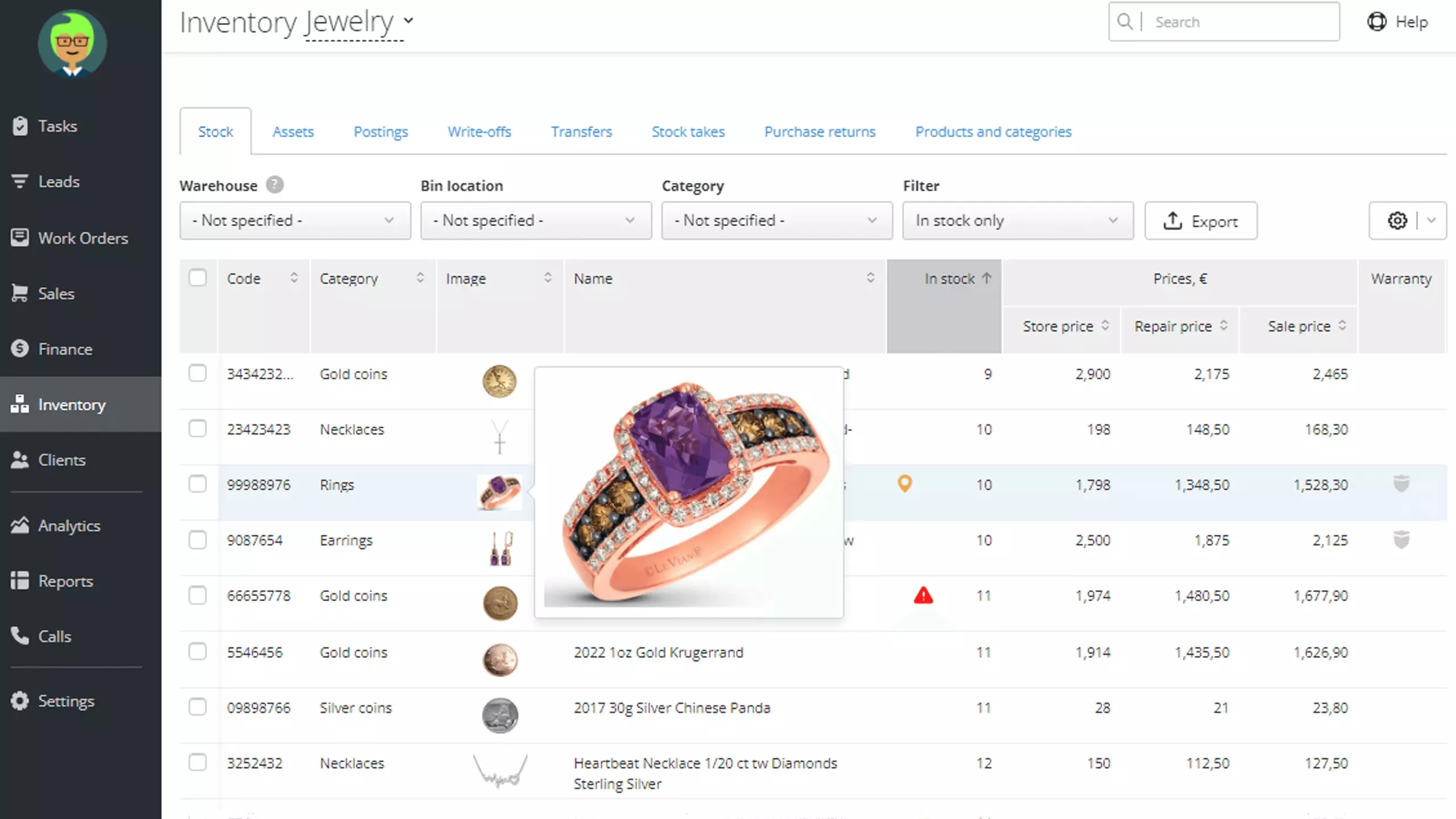 Display of low-in-stock items in RO App
3. Physical storage space. Before ordering make sure that the storage space is capable to store a variety of products you need for your business operations.
4. Cost of warehouse storage. Research carefully before deciding what product mix is the best option for your business and what budget you’ll need.
Smart inventory management increases profit. Sign up for a free RO App trial today to make the most out of your stock
Execution and Record-Keeping
Keeping records of your inventory is a challenging task that involves lots of manual work. The good news is — you can automate some processes. There are many tools out there like special devices and software solutions that will save you hours of time. For example, mobile scanners can be used to scan incoming shipments and automatically create a purchase order in the system. This will eliminate the need to count, document, and update the inventory.
The main purpose of stock control is to keep records of every action done to items in your warehouse. You should commit yourself and your team to do this regularly for at least four reasons: make operations run smoothly, prevent loss or damage, eliminate theft, and get valuable analysis of inventories to optimize cost. E.g. in RO App, there is an Assortment Analysis Report that will inform you about what goods or categories are often used in services you offer and how much profit they generate for your business.
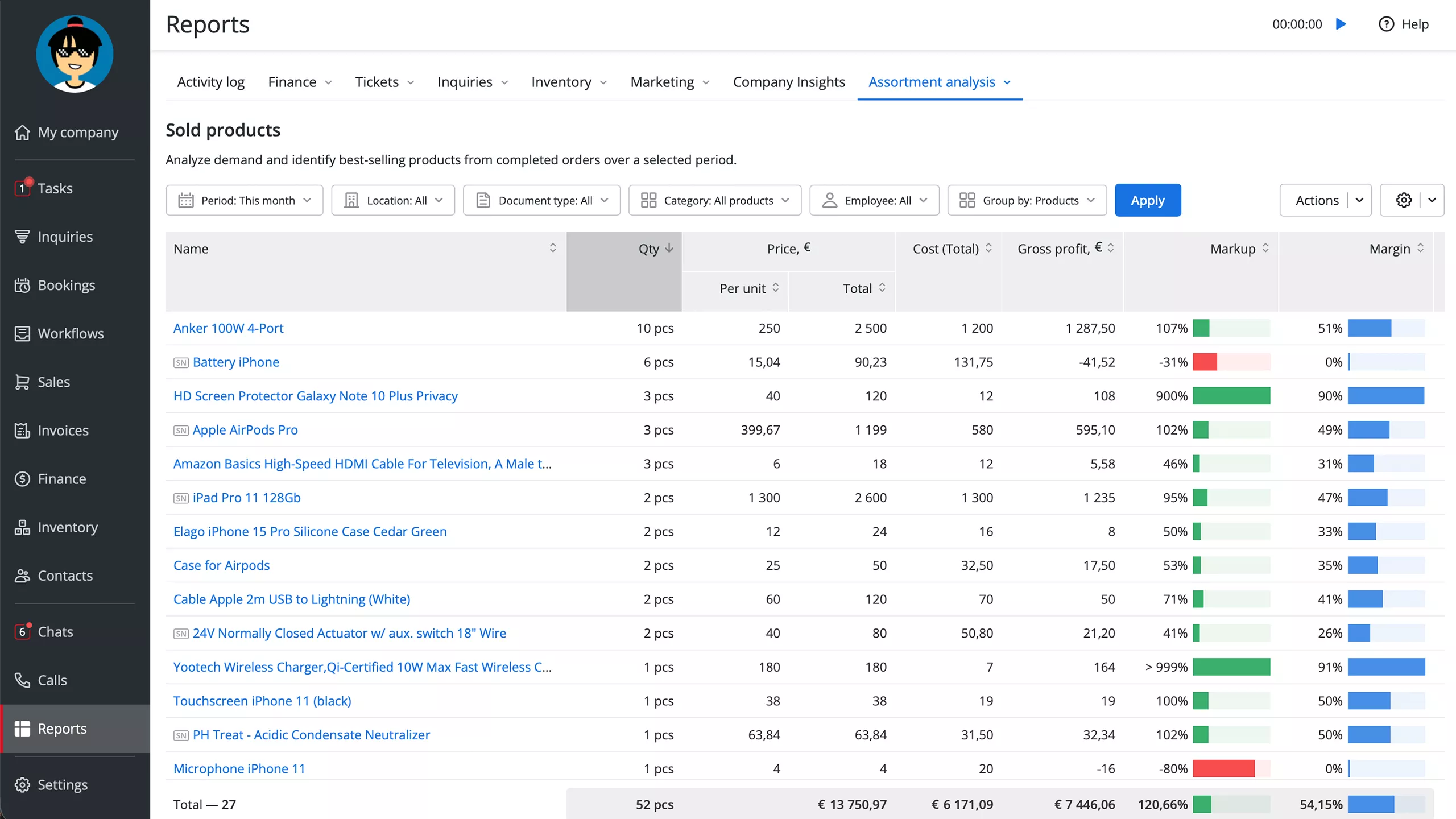 Assortment Analysis Report feature in RO App
Techniques to Maximize Efficiency When Managing Inventory
In order to avoid any unnecessary expenses, small businesses should continuously improve their processes and try out different approaches. Focus on avoiding keeping a product in stock when the customer flow is decreasing while optimizing your procurement procedure to be ready to take advantage of sales opportunities. Have a look at the following inventory improvement ideas:
1. Commitment: Commit to a quantity and delivery schedule for items your company needs and know in advance what you will do in the event of stockouts.
2. Diversification: Order smaller quantities of a broad range of items.
3. Multiple-Location Inventory: If one location needs an additional order for an item, simultaneously order it from another location. E.g. When using RO App, you can create digital warehouses for each of your locations and quickly perform product transfers.
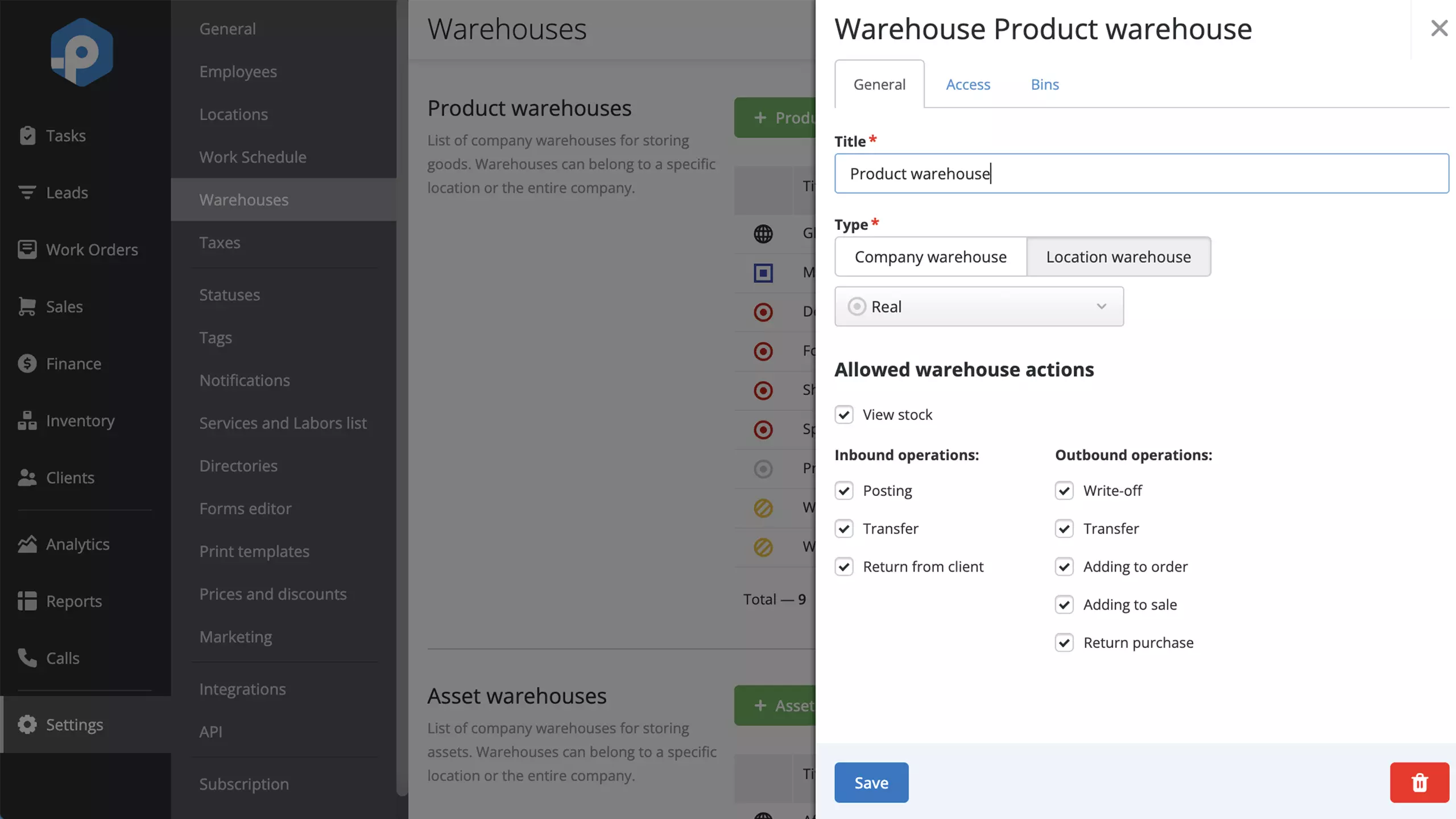 Digital warehouses in RO App
4. Model-Based Ordering: Carefully manage your inventory by keeping track of the items sold and the items stocked — order enough of those items to assure continuous availability. Instead of relying on your suppliers to tell you how much inventory to order, you can make the choice yourself by modeling how your sales are likely to continue.
5. Blanket Purchase Orders: Find reliable suppliers to build good relationships and ensure regular deliveries on attractive terms. Blanket purchase orders are preferred when the inventory doesn’t need to be replenished often or when you can afford to have a one-time wait for a stocked item.
6. Smart Inventory Controlling System: Choose a solution that gathers all the critical information and provides the data and inventory reports for planning and decision-making. With digital inventory management tools, you’ll use your inventory smarter, generating your profit continuously.
Final Thoughts
When working with inventory, it's important to know that it's not just about the physical goods that you sell in your shop but it's also about what you'll need to buy, when to order, and how to keep records of everything that is going on in your warehouse. Remember that inventory management is an ongoing process that needs to be constantly monitored and adjusted for the changing needs of your company. Use automation tools and test different methods to optimize your stock management, save time, and keep your inventory moving.
FAQ
How to create an inventory management plan for a small business?
Follow these steps to develop a plan for managing inventory in a repair shop, parts store, or local retailer:
- Assess your inventory levels and determine the optimal amount to meet customer demand. Analyze historical sales data over various sales channels, average inventory, and current market trends to forecast future demand.
- Choose inventory management software and implement barcode scanning technology. This will help you ensure accurate and real-time inventory data.
- Develop a regular inventory count and reconciliation schedule to identify discrepancies and prevent stockouts or excess inventory.
- Establish clear procedures for ordering, receiving, and storing inventory and monitor and manage potential issues, such as expiration dates or damaged goods.
- Regularly reviewing and adjusting your inventory management plan based on changing customer demand and market conditions.
What is the best inventory management strategy for small retail businesses?
The best strategy for small businesses is to adopt a just-in-time (JIT) inventory system. This strategy only involves ordering and receiving inventory when needed to fulfill customer orders, so you can minimize the costs of holding excess inventory, such as storage and obsolescence. It also helps to reduce the risk of stockouts and ensures that the business has the right amount of inventory at any given time. Additionally, implementing an inventory management software solution can provide real-time visibility into stock levels and inventory analysis, enabling small retailers to optimize warehouse operations and make data-driven decisions.
Does RO App integrate with accounting software?
Yes, it does. You can instantly synchronize invoices, work orders, clients, and taxes in your RO App account to QuickBooks Online and Xero. This integration also allows you to automatically save goods and services from work orders or invoices to QuickBooks and Xero.