 Mary
Mary
What Is a Work Order? Definition, Tips, and Examples (2026)
Work order basics, sorted: definition, required fields checklist, examples for repair and field service, plus a copy-friendly template.
A work order is a document that authorizes and records a service task — capturing the customer’s request, scope of work, assigned technician, required parts, labor costs, and current status. It is created after a customer approves an estimate and serves as the central record from job start to final invoice, keeping every detail in one place.
Table of Contents
What Is a Work Order?
Work Order vs Repair Ticket vs Job: Are They the Same?
When Do You Need a Work Order?
What Should a Work Order Include? Required Fields Checklist
Bundles in Work Orders: When One Service Includes Multiple Items
Work Order Template
A Modern Digital Work Order Flow: Estimate to Payment
Frequently Asked Questions about Work Orders
Conclusion
Two weeks into running a repair shop, most owners learn why work order management matters the hard way. A customer picks up their laptop, takes one look at the invoice, and says that is not what they agreed to. The tech remembers it differently. Nobody wrote anything down.
A work order is how you stop that from happening. It serves as a documented record, in paper or digital form, of the customer’s request, the work your team committed to perform, the assigned technician, required parts, and associated costs. When details are questioned later, the record provides clear answers.
Once my team saw that work orders were clear, appointments were organised, and everything was centralised, they changed their perspective. Within a few weeks, RO App became a natural part of our daily operations.

In this guide, you’ll learn what a work order is in 2026, what belongs on a work order form, how different industries use the terminology, three free work order templates you can copy today, and what the digital workflow looks like in software. Whether you run a repair shop, manage field service crews, or handle maintenance work orders across multiple locations, one company may call it a work order, another a repair ticket, and another just a job — all covered below.
What Is a Work Order?
A work order is the document that lives between a customer’s request and a finished job. It is the core of effective work order management — it authorizes the work and records everything that happens from start to finish. In most shops, the process begins when a customer brings in a device or calls about a job, an estimate is prepared, and the customer approves it.
A work order gets created from that approved estimate, the technician works off it, and logs what they did. When everything is done, the order becomes the basis for an invoice. That whole chain runs on the work order.
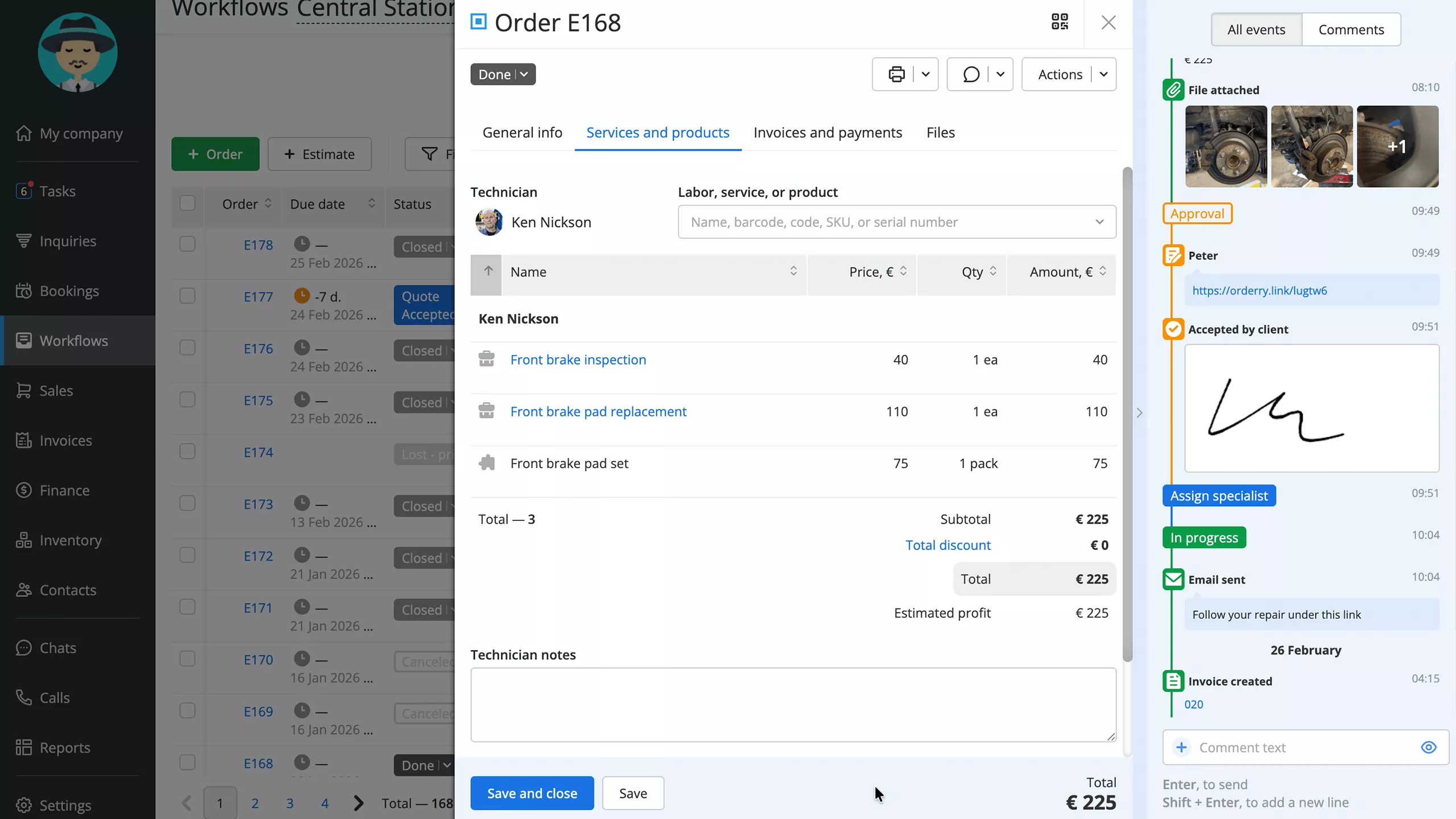 Digital work order in RO App
Without one, information gets scattered. It lives in a text message, in a tech's memory, or on a paper receipt that ended up in a drawer. That works fine for a while. Then a job goes sideways, or a customer disputes a charge, and suddenly nobody can find the details. Work order software closes that gap by keeping the whole sequence in one system.
Work Order vs Repair Ticket vs Job: Are They the Same?
It depends on the shop, which is part of what makes this confusing.
A work order is the most complete version of the record. It covers scope, parts, labor, cost, status, and the assigned technician. Everything that goes into delivering a job lives on it.
A repair ticket, sometimes called a service ticket, is usually the intake record, the thing that gets created when a customer first comes in or calls. Some companies treat a ticket as a work order from minute one. Others begin with a ticket, lock in the scope, and convert it into a work order after the estimate receives the customer’s approval.
A job means different things in different contexts. In casual conversation, it usually just means the work. In certain software platforms, it is a specific record type. In others, a job is a sub-item that sits beneath a larger work order rather than being its own standalone item.
It doesn’t matter what you call it as long as your team is consistent. Confusion happens when half the shop says ticket and the other half says order, leaving the current status unclear. Choose a system, define the terms, and stick to it.
For a full breakdown of how to manage and track jobs from open to close, check out how to keep track of work orders: tips & best practices.
When Do You Need a Work Order?
Pretty much any time a paying customer is involved, the scope or cost needs to be clear before work starts. Here are the situations where not having one tends to create problems:
- A phone, laptop, or appliance gets dropped off by the customer. The work order locks in the issue description, device details, estimated cost, and expected turnaround before anyone opens it. It protects both sides if details shift later.
- A tech drives out to a job site. HVAC call, plumbing issue, electrical work, it does not matter. The work order tells them the address, what was agreed, and what they need to bring. Without it, they are guessing until they get there.
- A vehicle comes in for service, scheduled or otherwise. A repair work order captures the make, model, mileage, what the customer asked for, and what the tech actually finds during the inspection. That last part matters when the findings change the scope.
- Managing maintenance across multiple units or buildings can get messy. Work orders help property managers assign tasks to specific people and monitor completion without constant follow-ups.
- A warranty claim has to go through. The work order is what supports it. A solid record gets the claim processed. A vague one or a missing one gets it delayed or rejected.
- A customer wants something installed or set up. The scope of these jobs has a way of expanding mid-task. A work order nails down what was agreed before the first hour of labor gets logged.
What Should a Work Order Include? Required Fields Checklist
The fields vary by industry, but the core of a service work order stays consistent. Here is what a well-built work order form should cover:
- Customer name and contact information
- Asset, device, vehicle, or equipment details (make, model, serial number, mileage)
- Description of the problem or requested service
- Estimate or approved scope of work
- Parts and materials required
- Labor time and rates
- Priority level and due date
- Assigned technician or team member
- Current status (open, in progress, waiting for parts, completed)
- Notes, inspection findings, or photos (optional but useful when a customer questions something)
- Pricing, applicable taxes, and total cost
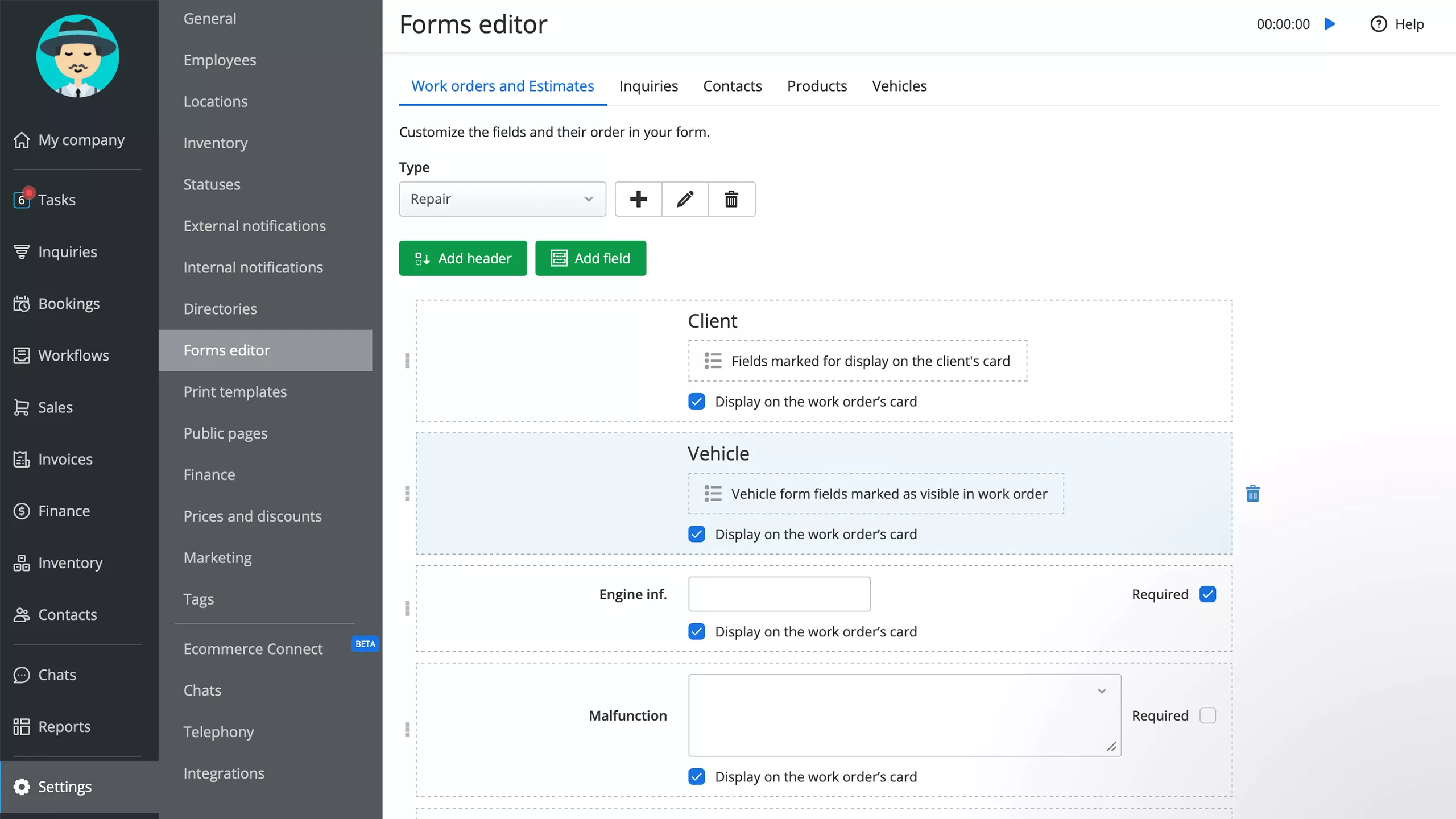 Example of a customizable work order form in RO App's form editor
A customer signature field is worth adding if your shop changes scope mid-job or takes a deposit up front. Not every business needs it, but for jobs where the original estimate tends to shift, having a signed acknowledgment before the added work starts saves a lot of friction at the end and makes customer management easy.
Bundles in Work Orders: When One Service Includes Multiple Items
An oil change is never just oil. Anyone who has worked in auto service knows this. There is oil, a filter, disposal, and labor. Sometimes a tire rotation or a multi-point check gets added. Building that out line by line every single time is slow and creates openings for things to get missed.
Bundles solve this. A bundle is a pre-configured set of services and parts that gets added to a work order as a single item. One selection and it populates everything: parts, labor, pricing. An "Oil Change Bundle" fills in all five components without anyone thinking through each one.
Electronics shops do the same with setup packages. Device prep, screen protector plus accessories, all bundled and priced as a unit. Inspection packages, installation combos, and seasonal maintenance checks all follow the same logic.
The bigger benefit is not speed. It is consistency. Every tech builds the order the same way. Pricing does not drift. Customers get the same quote for the same service regardless of who writes it up.
Work Order Template
These three templates cover the most common service scenarios. Pick what applies, discard what doesn’t, and include any missing information to match your workflow.
Work order form for repair shops (phones, electronics, appliances)
- Customer: [Name, Phone, Email]
- Device: [Brand, Model, Serial Number]
- Problem reported: [Customer's description]
- Diagnosis: [Technician findings]
- Approved work: [Parts + labor, e.g., screen replacement bundle]
- Technician: [Name]
- Due date: [Date]
- Status: [Open / In Progress / Ready for Pickup]
- Total: [€]
Work order form for field service (HVAC, plumbing, electrical)
- Customer: [Name, Address, Contact]
- Job type: [Install / Repair / Inspection]
- Location details: [Site access notes]
- Scope: [Agreed work description]
- Parts: [Materials list with quantities]
- Technician: [Name, vehicle]
- Scheduled date/time: [Date + window]
- Status: [Scheduled / On Site / Complete]
- Invoice total: [€]
Work order form for auto and marine repair
- Vehicle/vessel: [Year, Make, Model, VIN or HIN]
- Customer: [Name, Contact]
- Mileage or hours: [Current reading]
- Service requested: [e.g., Oil Change Bundle: oil + filter + disposal fee + labor]
- Additional findings: [From inspection]
- Approved add-ons: [If any]
- Technician: [Name]
- Completion date: [Date]
- Total: [€]
A Modern Digital Work Order Flow: Estimate to Payment
Paper forms still exist. Some shops run entirely on them and do fine. But a lot of businesses have moved the process into software, and the flow looks quite different when they do.
It usually starts with a customer message, a call, or a walk-in. Someone turns that into an estimate, and in some systems, that can happen directly inside the chat that started the conversation, without switching to estimating software. The estimate goes to the customer with a link.
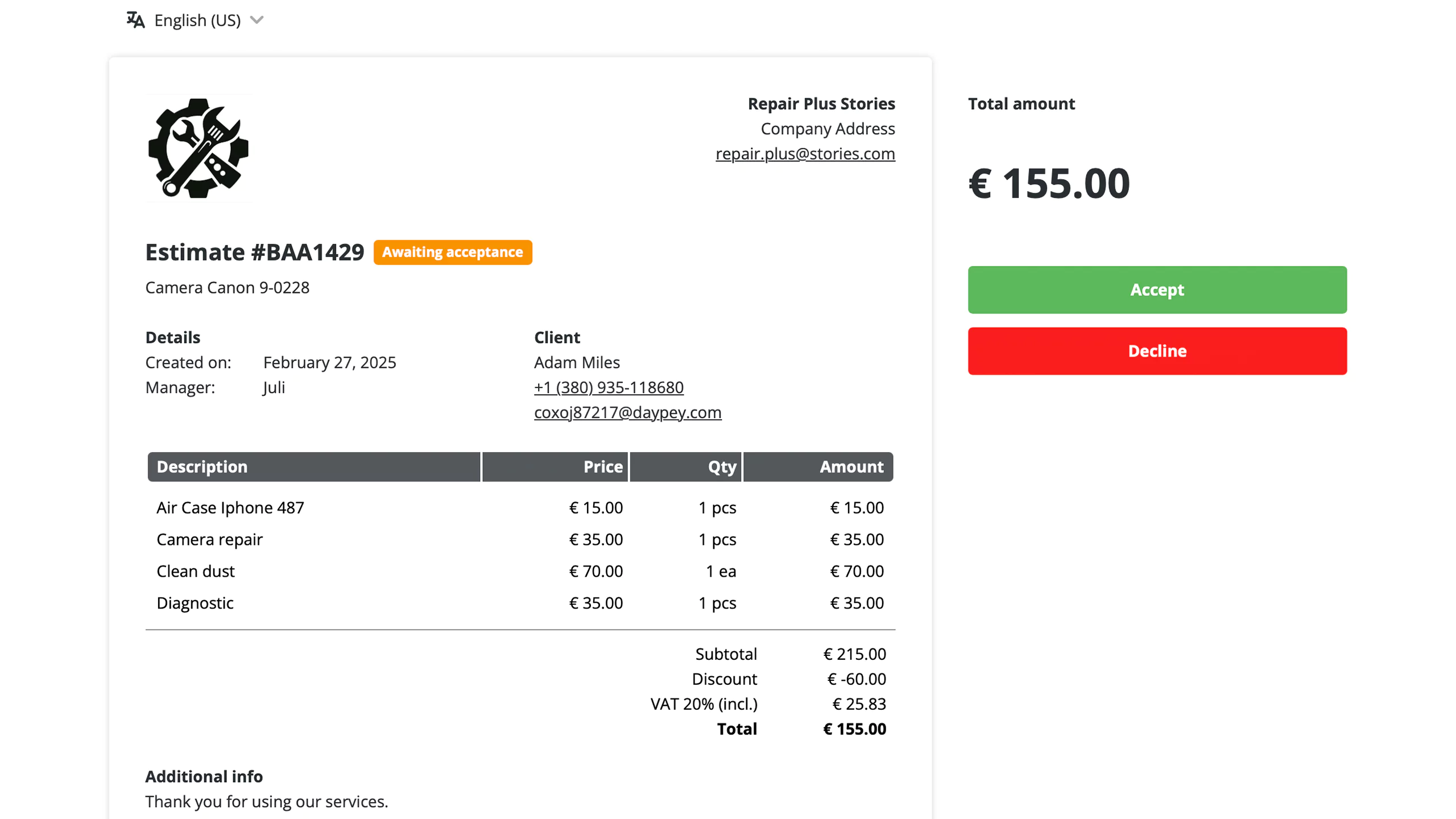 Digital estimate for customer
Customers review the estimate, confirm the scope online, and submit any required deposit through the same link before work begins. Once signed, the estimate becomes a work order automatically. The assigned technician is notified and can view the scope, parts list, and any notes before starting the job.
As the job moves through stages, the customer gets an SMS or email update. No one has to remember to send a manual message.
Before RO App, our workshop assistants spent 80% of their days calling clients, saying their equipment was ready to pick up.

When the job is done, the work order has everything needed for the invoice. No re-entry. For field teams, a mobile app means status updates happen at the job site in real time. The full breakdown of managing this across a team is in the guide to keeping track of work orders, where you can also learn about customer communication software.
Want to see how this looks in a real workflow? Book a demo and walk through a job from estimate approval to invoice.
Frequently Asked Questions about Work Orders
Is a work order the same as a repair ticket?
In most shops, yes. The terms get used interchangeably. If there is a technical difference, a repair ticket tends to be the intake record created when the customer first comes in, and the work order is the fuller document used to actually manage the job. In many software systems, the difference between them isn’t strictly enforced.
What's the difference between a work order and an invoice or estimate?
Three different documents, three different stages. An estimate goes out before work starts. It tells the customer what the job will cost and what is included. A work order is the internal record your team works from once the estimate is approved. Invoicing software supports the final step by collecting payment. Using one document for all three jobs, which some shops try to do, creates confusion quickly.
What industries use work orders?
From vehicle and motorcycle repair to appliance, HVAC, plumbing, and electrical services, as well as property maintenance, marine work, medical equipment servicing, and IT support, these industries share one need: recording the approved scope and cost before work begins. The format adapts, the purpose does not.
What should be on a work order?
Include customer contact information, the problem or requested service, approved scope, parts, labor, assigned technician, due date, and total cost. Status is worth adding too, particularly if several jobs are open at once and you want a fast overview of each one. The bottom line is that what should be there depends heavily on what your shop does and the process involved.
Do small businesses need work order software?
Not on day one. Paper and spreadsheets can work. But most small repair and field service shops hit a point where the informal system starts costing them money through missed items on invoices, disputes they cannot resolve, and jobs that fall through the cracks. Work order software brings the customer record, the job details, the invoicing, and the communication into one place. It tends to pay for itself faster than people expect.
Conclusion
Work orders are not complicated. They are documentation, and documentation is what keeps a service business from running on trust and memory, both of which fail at the worst moments. It is easier to have everything documented for when anyone wants to refer to what was agreed upon.
Shops that use a consistent work order process have fewer billing disputes, cleaner handoffs between front desk and techs, and customers who feel more confident about what they are paying for. The ones that skip it manage fine until they do not, and the point where it starts mattering is usually a painful one.
Use a simple format from the start. Make it standard for every job in 2026, not just the tricky cases. Adjust the fields as you learn what your team needs day to day. When you are ready to look at the management side, tracking statuses in job scheduling software, and closing out efficiently, the guide on how to keep track of work orders is the right next read.