 Angela
How Meléndez Small Motor Repair Took Control of Their Workflow
From notebooks to a single system that connects repairs, customers, and parts
Before: notebooks, lost data, no visibility
After: full control, faster workflows, more revenue
- Everything in a complete solution
- More jobs handled with the same team
- Less time spent tracking, more time repairing
- Faster turnaround on each job
If you run a small engine repair business or a power tool shop, you already know the challenge. Jobs come in faster than you can record them. Parts go missing — or worse, you order parts you already have. Customers call asking for status updates you can't quickly provide. Your team is skilled at repairs, but the business side relies on notebooks and memory.
That was the situation at Meléndez Small Motor Repair in Puerto Rico before they switched to RO App. Six people, a busy shop, two revenue streams — repair jobs and spare parts sales — and no clear visibility into operations.
This is what changed when they adopted the right small engine repair software for their business.
Still tracking jobs in notebooks?
Move everything into one system and take control of your shop. Try RO App free. No credit card required.
Essential Features of Small Engine Repair Shop Software
Most generic business software was not designed for repair shops. It handles invoices, tracks customers, and might do basic inventory. However, it does not reflect how repair work actually happens — managing a job from intake to collection.
What does a small engine repair shop actually need from software? Repair shops have specific needs that general tools miss:
- Job tracking by device
- Parts inventory tied to jobs
- Customer history on demand
- Real-time status visibility
Meléndez Small Motor Repair specialises in chainsaws, grass trimmers, grinders, pressure washers, mixers, and more. They also sell spare parts for what they repair, which means they need inventory management and job tracking to work together, not in separate systems.
What stood out to us was the idea of managing the entire repair process in one software. Before that, everything was disconnected. Now we open RO App and see exactly what’s happening across jobs, customers, and parts.
Kritzia Meléndez
Co-Owner
Meléndez Small Motor Repair
Manual Job Tracking, Lost Customer Data, and No Inventory Visibility
Before implementing dedicated small engine repair software, the Meléndez team relied on notebooks, loose notes, and memory. This created three major issues:
- Customer information was frequently lost With no central system, customer contacts, notes, and repair history were scattered. Every new job started from scratch, even for returning customers.
- Nobody knew the status of any repair. Checking the status of a job meant finding the last person who worked on it. That works for a few jobs, but not when managing dozens at once.
- Inventory was completely invisible. Parts sales and repair parts were tracked in the same unorganised way. The team never knew exactly what was in stock or what needed ordering.
Before RO App, we ran everything pretty manually — notebooks and loose notes. We were losing customer information, had no visibility into repairs, and couldn’t keep track of jobs. Now everything is in one system, and we finally have full control.
Kritzia Meléndez
Co-Owner
Meléndez Small Motor Repair
Why RO App Was the Best Choice for Small Engine Repair Management
Kritzia and her co-owner searched online for software designed around the actual work of running a repair business.
What stood out about RO App was the ability to manage repair jobs, customer records, and inventory in one system. They did not want multiple tools or manual data tracking — they wanted a single, reliable system.
If you run a small engine repair shop and deal with jobs and parts every day, RO App helps you get organised and gives you full control over your operations. That’s what made the biggest difference for us.
Kritzia Meléndez
Co-Owner
Meléndez Small Motor Repair
For a shop that handles both repair services and parts sales, that integration matters. When a repair job uses parts, the inventory should reflect it. When a customer picks up their pressure washer, their full history should be right there. That's what purpose-built small engine repair software looks like in practice.
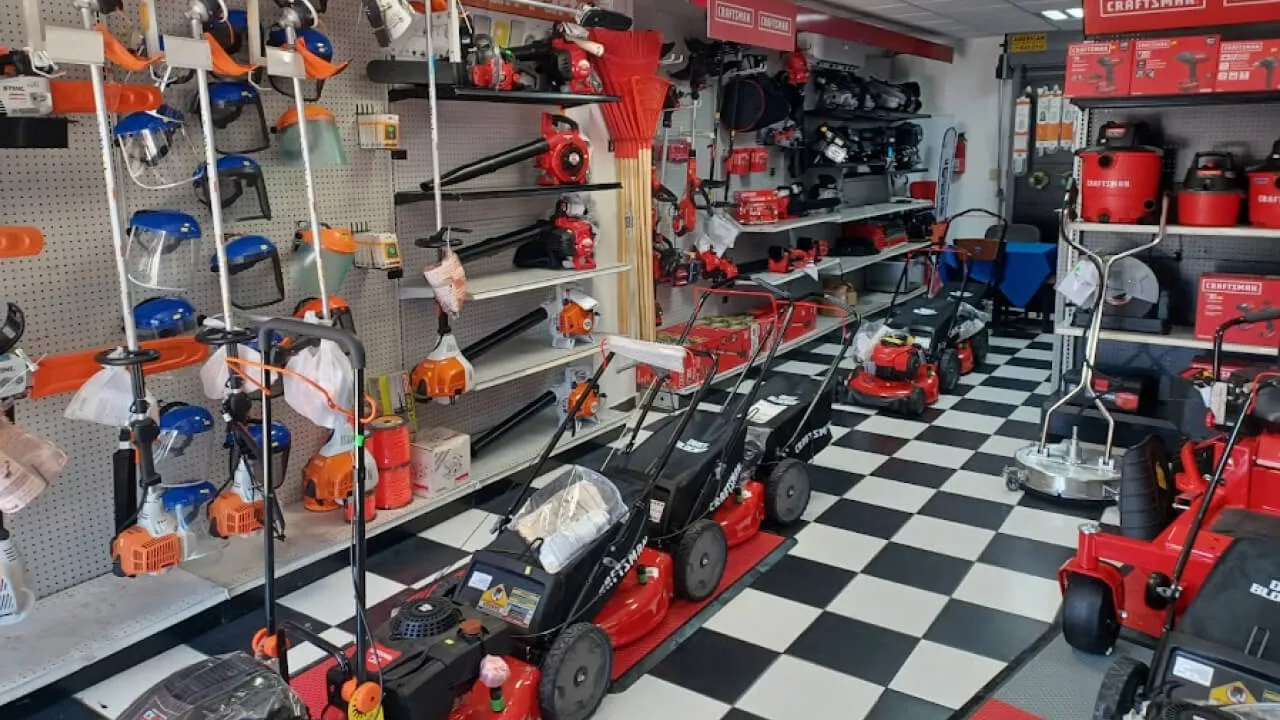 Meléndez Small Motor Repair’s showroom and repair shop
Fast Adoption: Transitioning a Non-Technical Team to Digital Workflows
Introducing new software can be challenging, especially for teams with limited technical experience. Meléndez Small Motor Repair hit the same early friction most shops do: the learning curve of any new system.
In this case, the system was intuitive enough to learn without formal training. Over time, the team adapted, and the platform became part of their daily workflow.
At first, it was a change for the team, especially for those who aren’t technically confident. However, the system is intuitive, and everyone adapted little by little. Now RO App is part of how we work every day.
Kritzia Meléndez
Co-Owner
Meléndez Small Motor Repair
This is worth noting for any repair shop owner considering a switch: the biggest barrier is usually the transition, not the tool itself. A well-designed repair shop management solution should reduce operational chaos faster than it takes to learn — and that's what happened here.
One System for Jobs, Customers, and Inventory
Once the team was using RO App consistently, the impact showed up across every part of the business:
Real-time job visibility
Every repair now has a live status. The team can see what's in the queue, what's in progress, and what's ready for pickup. For a 6-person shop handling multiple job types at once, that visibility is the difference between controlled and chaotic.
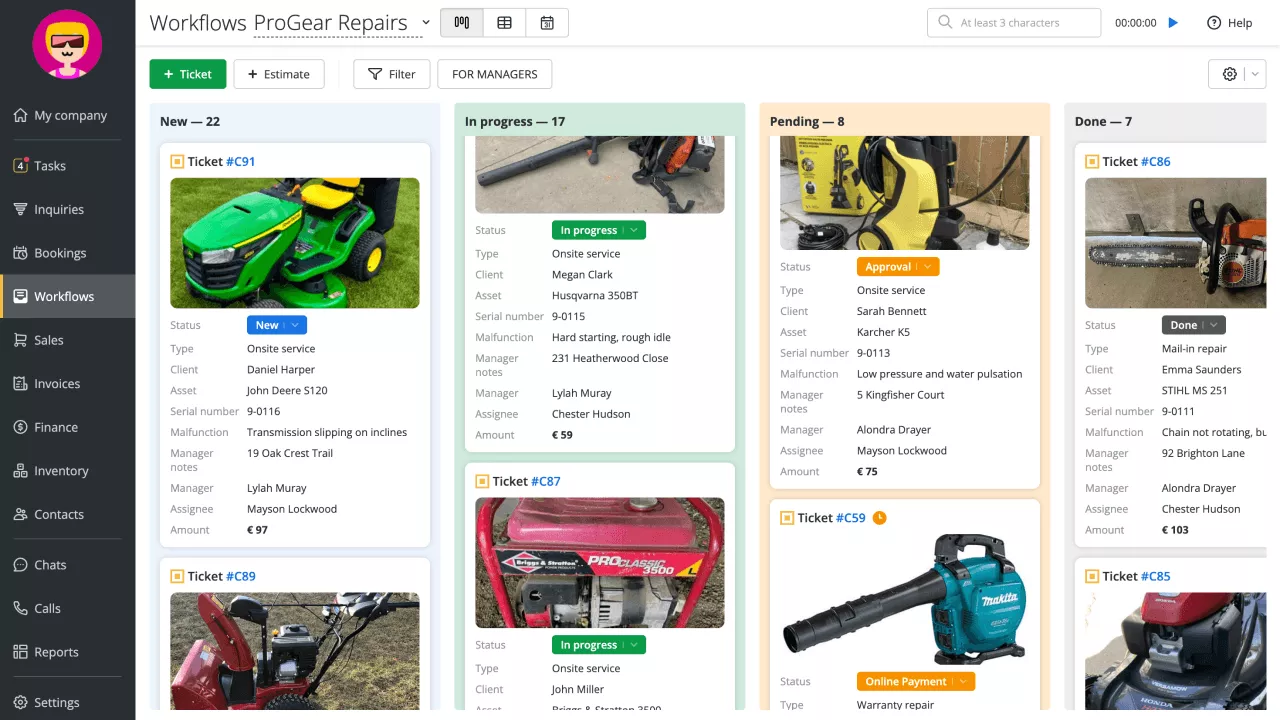 Repair workflows in RO App
Full customer history
When a customer walks in or calls, their entire repair history is right there. No searching through notebooks or trying to remember what was done six months ago on a chainsaw. This makes customer service faster and more credible.
RO App has been a key tool for our growth. It helped us organise our processes, work more professionally, and deliver better service to our customers.
Kritzia Meléndez
Co-Owner
Meléndez Small Motor Repair
Inventory under control
Parts stock is now tracked properly. The team knows what they have, what parts are consumed, and what needs to be reordered. For a shop selling both repair services and spare parts, inventory management tied to the job workflow is a significant operational upgrade.
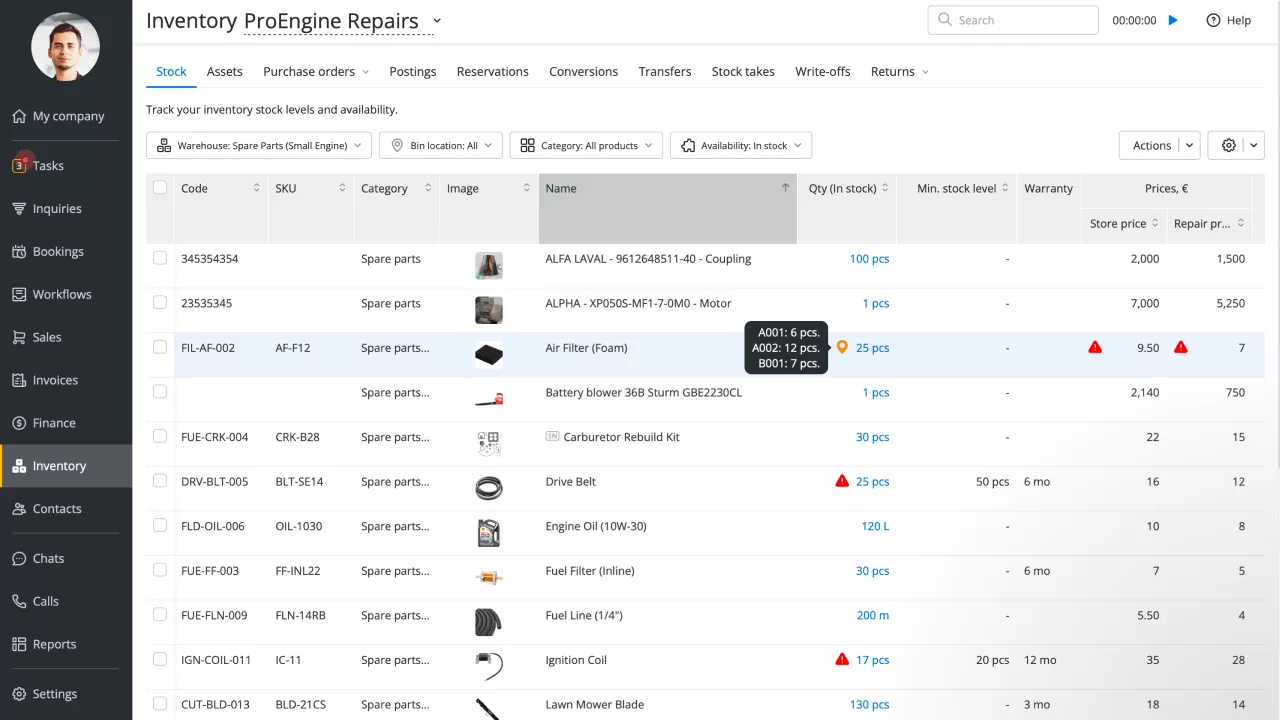 Inventory management in RO App
Inventory was one of our biggest problems — we never knew exactly what we had or what we were missing. Now everything is tracked in one place, and we don’t waste time searching or guessing anymore.
Kritzia Meléndez
Co-Owner
Meléndez Small Motor Repair
Core Benefits: Automated Status Updates and Real-Time Visibility
Ask Kritzia what she'd highlight from RO App, and the answer is clear: work order management. Being able to see the entire repair workflow in one place — intake, diagnosis, parts used, status, pickup — completely changed how the shop operates.
Being able to see the entire repair workflow in one place completely changed the way we work. Before RO App, we were reacting to problems. Now everything is structured and clear.
Kritzia Meléndez
Co-Owner
Meléndez Small Motor Repair
For a small engine repair shop, a work order isn't just a ticket. It's the full story of a job: who brought it in, what's wrong with it, what parts were needed, who's working on it, and when it's done. Having that information organised and accessible is what turns a busy shop into a well-run one.
Handle more jobs with the same team
Get full visibility into every repair, part, and customer. Start your 7-day free trial. No credit card required.
The Business Outcome: Higher Revenue, More Jobs, Improved Repair Turnaround Time
Before RO App, time was wasted on tracking jobs, searching for information, and figuring out what was happening in the shop. Now that work is handled by the system.
Key outcomes include:
- More jobs completed with the same team. No need to hire more people to grow. The existing team simply works with more structure.
- Less time spent tracking and coordinating. No need to search through notes or ask around for updates. Everything is visible in one place.
- Faster reapir turnaround. Clear workflows mean fewer delays between steps.
- Improved customer communication. The team knows exactly when to update customers and what to tell them.
- Increased revenue from existing capacity. More completed jobs + fewer delays = more money coming in.
Once we started using RO App, our team became more efficient, we improved customer follow-up, and we started handling more jobs in less time. That also led to better revenue.
Kritzia Meléndez
Co-Owner
Meléndez Small Motor Repair
RO App thanks Meléndez Small Motor Repair for sharing their story. We look forward to supporting their growth in the years ahead.