 Angela
Effective Employee Management System To Boost Your Small Business
Find out what workforce management tools you need to build a strong team of professionals
Table of Contents
Employee Management Basics You Cannot Ignore
Everything is Possible It the Work is Organized Well
How to Set Up Employee Payroll For Transparent and Timely Payments
Employee Productivity Reports are Your Helping Hand
Employee Activity Log to Increase Internal Security
Final Thoughts
Many new business owners are faced with the challenge of managing employees effectively. This can be difficult and sometimes stressful, especially if you have a lot on your plate already. This blog post will give you easy tips on how to manage employees in order to boost your business in this competitive world.
Employee Management Basics You Cannot Ignore
No matter how small your business is, you will always have employees to manage. From hiring the right people to managing the team, there is always something that needs to happen. There are many things that can be done to manage your workers effectively, and here are just a few tips.
- Create a set of company values. Make sure all employees know what the company values are.
- Have an open-door policy. Hold regular 1-1 meetings to find out what the other person needs from the job. This is important to give employees direction, fair treatment, and feedback.
- Talk to your employees about their work. Talk about mistakes — the good and the bad. Explain the reasoning behind the "why" and "why not."
- Keep your employees updated on company achievements. Accept, acknowledge and celebrate success, big and small.
- Provide professional development plans. Personal growth motivates more than numbers in the paycheck.
- Be reasonable with your expectations. It can be tempting to give employees the responsibility of doing the work of an entire department, but this will only result in your employees feeling overwhelmed.
Everything is Possible It the Work is Organized Well
As a small business owner, you are responsible for keeping up with work schedules. But sometimes, this task can be difficult since you need to balance multiple projects and responsibilities. Fortunately, there are many tools and methods available to help you manage employees in an effective manner.
If you use the RO App software for managing your small business, you don’t need to look for additional programs to organize your employees’ time at work. With the built-in calendar and the Work Order Scheduler features, you can create schedules for different employee roles and locations, assign work orders and call-outs, track hours and days worked:
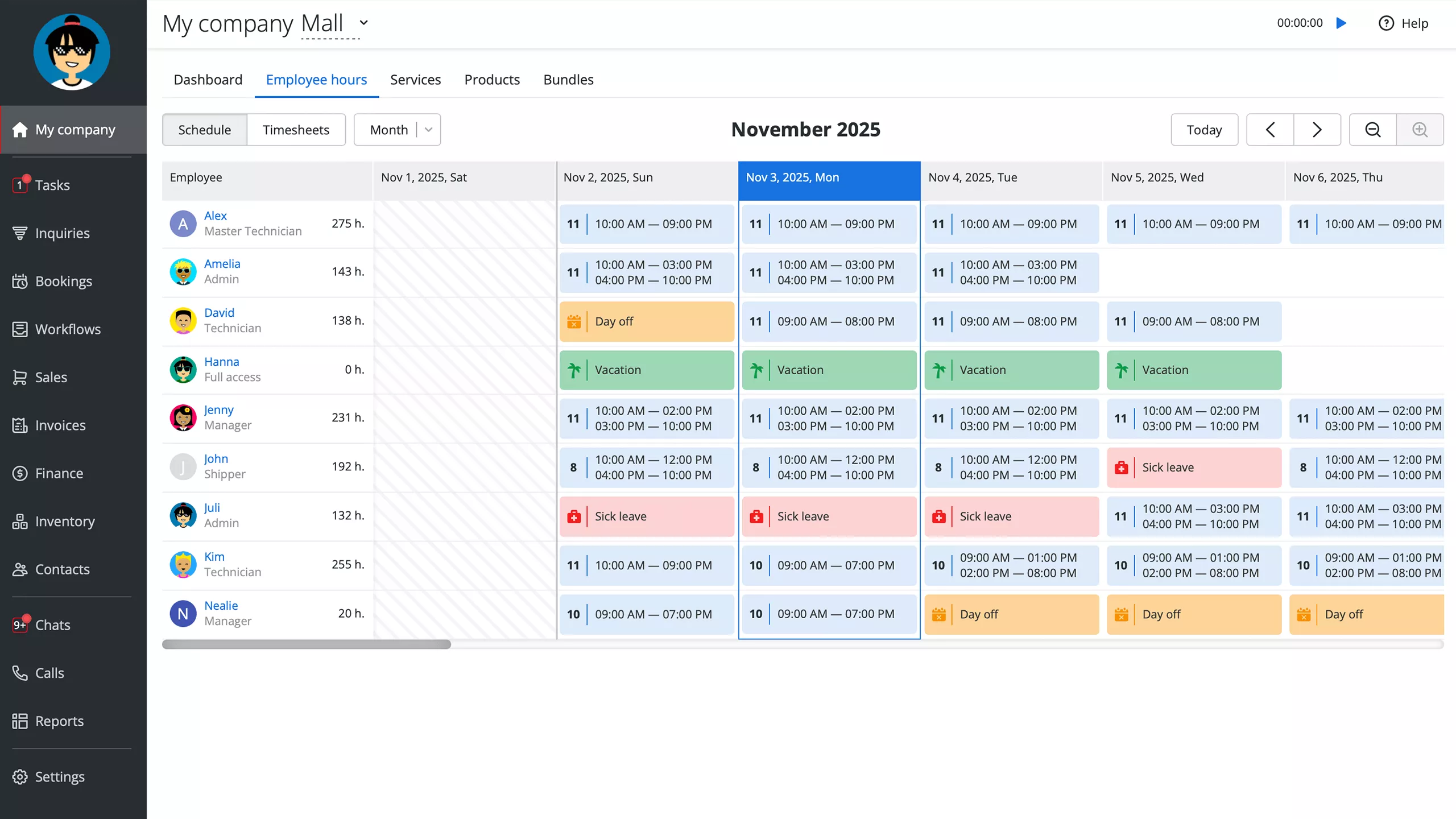 Screenshot of Employee Work Schedules in RO App
How to Set Up Employee Payroll For Transparent and Timely Payments
Payroll management is one of the most important aspects of running a successful company. This is also a time-consuming and stressful one and here is why:
- different countries have their own requirements which have to be taken into account when setting up an employee payroll system
- complex country's legislation when it comes to reporting wages and taxes
- there is a lot of paperwork involved when submitting social security and tax payments
To avoid any pitfalls, your first step of the process should be consulting with your local accounting specialist. The second step is to estimate how much money is to be allocated for wages at the start of the month. This needs to be the amount that can cover all employees for that month, taking into account any additional payments that may be needed for bonuses or commissions.
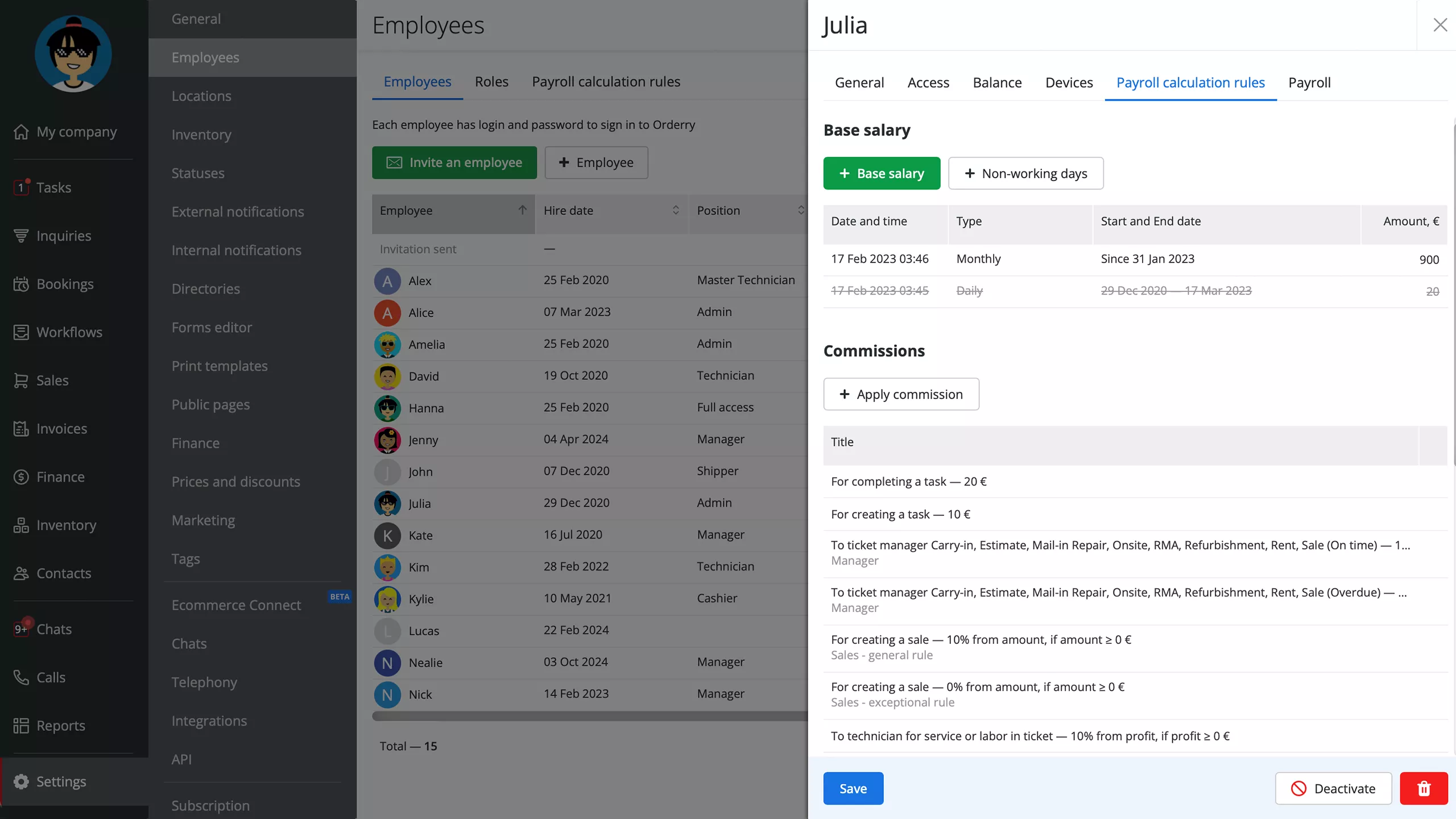
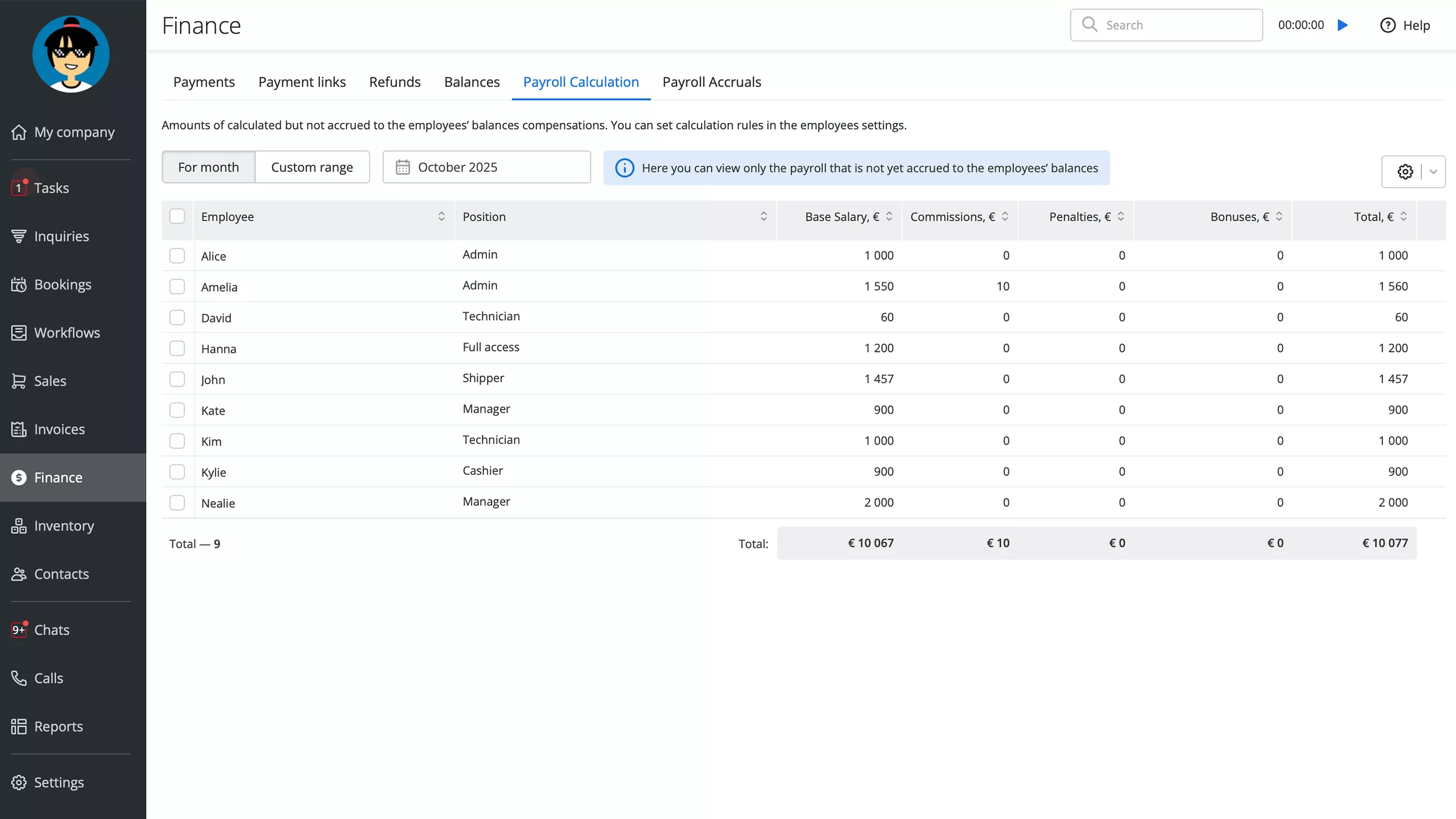
The final step is to prepare the employee payroll. Suppose you run a repair shop, and your employees have various seniority levels. Moreover, you have different pay systems like piece rates, hourly/daily salaries, and various incentives. In that case, you won’t be able to calculate the payroll manually without making mistakes or spending too much time. To make your end-of-the-month easier, you can automate all the administrative tasks in repair shop software:
- calculation of hourly and daily wages based on the Employee Work Schedules
- setting up coefficients to reward your most experienced employees
- adding commissions for urgent work orders or upsells
 Screenshot of the Payroll Report in RO App
Employee Productivity Reports are Your Helping Hand
It is essential to understand the level of productivity each of your employees is achieving. This will help you assess which team members are the most valuable and take the appropriate actions to ensure your employees are as productive as possible.
Employee productivity reports generated by your staff management system are vital to understanding why some employees are more successful. For example, you can compare how many work orders each of them closed successfully and their total amount by employees for any period:
 Screenshot of the Employee Report in RO App
Employee Activity Log to Increase Internal Security
Let’s face the truth — you will never have complete control over your employees in the workplace. However, you can see at least what they do in the business management software you use daily in your company. If they know all their actions in the system are visible to you, they will treat the internal business data on clients and operations more carefully.
Use the standout features of the Activity Log report to reduce human error risk, protect data, and eliminate fraud. On a single page, you can instantly track the records and acts of your employees and restore unintentional (or intentionally?) deleted objects in the worker management system.
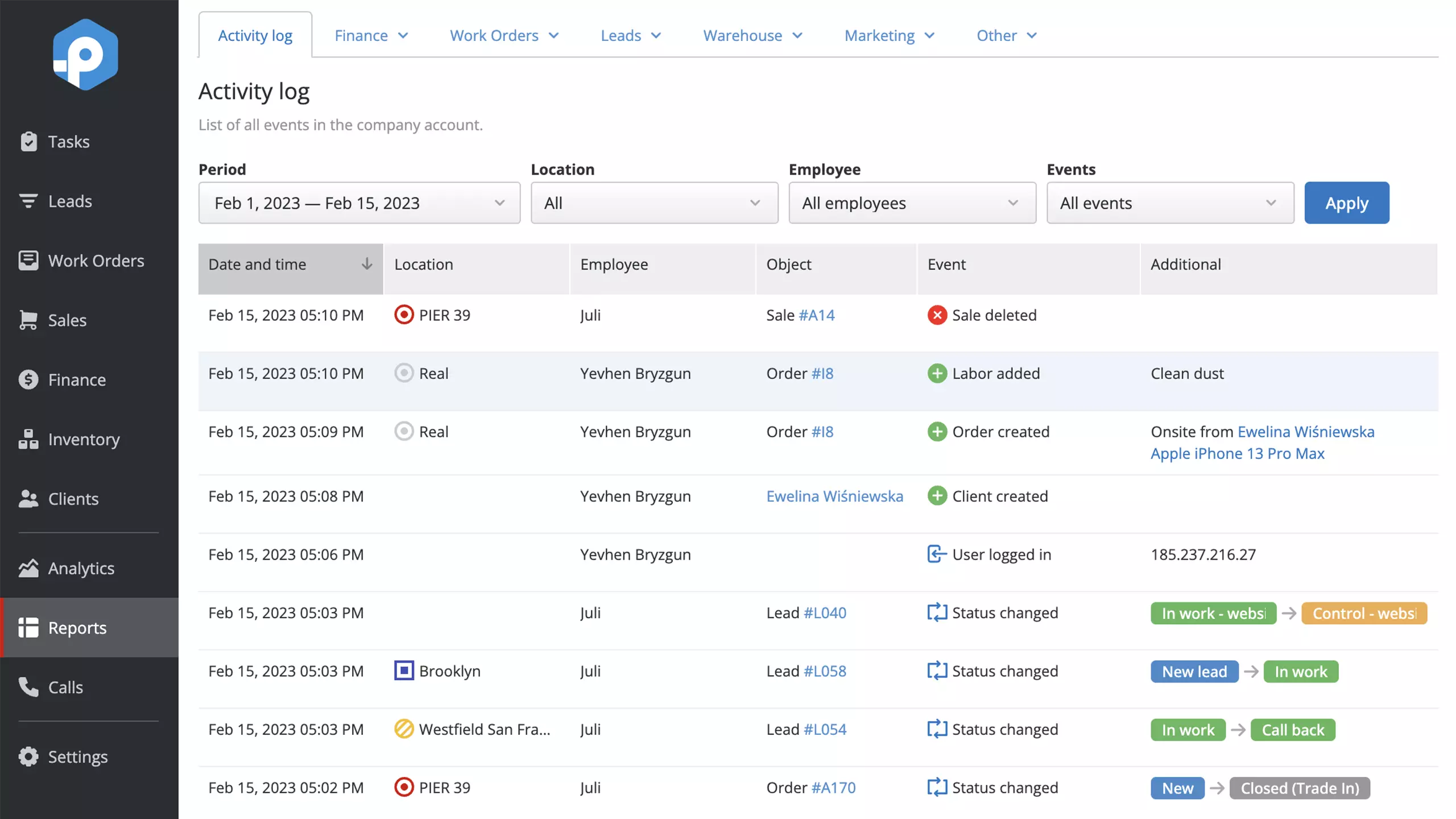 Screenshot of the Activity Log Report in RO App
Final Thoughts
As an entrepreneur, you know that it's hard enough to keep your business afloat, let alone try to find the time to manage your employees. It's not that you don't want to help your team – it's just that there isn't enough time in the day. That is why using automation tools like a work schedule planner and payroll computing rules are a must for a small business owner. Additionally, reports on employee productivity and actions done in the database will help you identify the growth points in your job workforce management as well as save you from ineffective or dishonest employees.
Frequently Asked Questions About Small Business Employee Management
How do I manage employees in my small business?
Small business employee management can be challenging, but several strategies can help. Сommunicate your expectations and goals to employees, ensuring they understand their roles and responsibilities. Monitor their progress in the small business employee management system, address concerns or challenges, and provide feedback during regular check-ins and meetings. Delegate tasks and empower employees to make decisions—this will help distribute the workload and foster a sense of ownership and responsibility. You should also provide ongoing training and development opportunities to improve employee experience and enhance their skills. Finally, creating a positive and supportive work environment where employees feel valued and appreciated can go a long way in managing their work effectively.
How many employees are included in RO App subscription plans?
In Startup, Business, and Enterprise plans, you can invite three employees to your account without additional fees. In the Hobby basic plan, this number is limited to two employees.
What is employee management?
Employee management refers to overseeing and guiding employees within an organization to ensure productivity, engagement, and satisfaction. It involves various activities such as hiring, training, assigning tasks, setting goals, providing feedback, and addressing issues or conflicts. Effective employee management requires strong leadership skills, effective communication, and the ability to motivate and empower employees. It is crucial for maintaining a positive work environment, fostering employee growth and development, and achieving the organization's goals and objectives.